Compliance isn’t simply a matter of checking a couple of boxes, but proactively monitoring and refining your processes on a day-to-day basis. As regulations have become more complex, compliance management software has become a must-have for fulfilling requirements. In this article, we’re going to look at the 10 best compliance management software.
Here is our list of the twelve best compliance management software:
- ManageEngine Log360 EDITOR’S CHOICE A security package that provides compliance with PCI DSS, FISMA, HIPAA, SOX, GDPR, and GLBA. Start a 30-day free trial.
- Check Point’s SASE (ACCESS FREE DEMO) A security package for hybrid systems that implements the transmission protection and authentication processes required by data protection standards, while also generating logs. Get access to the free demo.
- Site24x7 (FREE TRIAL) Delivered through a hosted monitoring service, this platform supports compliance management by checking IT infrastructure against regulatory frameworks such as GDPR, HIPAA, and PCI-DSS. Get a 30-day free trial.
- ManageEngine EventLog Analyzer (FREE TRIAL) Log analyzer and compliance management tool with log analysis, compliance reports, alerts, and more. Start a 30-day free trial.
- MyEasyISO Compliance management tool for ISO 9001, ISO 14001, and ISO 45001 with internal audit management, and emergency preparedness planning.
- Netwrix Auditor Auditing software with risk assessments, alerts, and change/access/configuration reports.
- Workiva Wdesk Compliance management solution you can use to prepare for SOX compliance with workflow and tasking.
- AuditBoard Audit management software for managing regulatory requirements with compliance assessments, issue management, dashboards, reports, and more.
- SolarWinds Security Event Manager A SIEM tool that can detect threats, vulnerabilities, and compliance violations. It includes compliance reports and automated responses to security violations.
- LogicGate Risk Cloud -Audit management software with controls and frameworks for HIPAA, PCI DSS, and SOC 2.
- Onspring Audit Management Software Audit management tool with automated risk assessments, live dashboards, reports, issue management, and more.
- Compliancy Group HIPAA Compliance Software Compliance management software for HIPAA with assessments, issue management, breach support, a HIPAA seal of approval, and more.
The list includes a range of tools designed to help manage compliance for regulations such as PCI DSS, HIPAA, GDPR, GLBA, SOX, and more. Tools listed range from log management tools to auditing software, and GRC/compliance management platforms.
The Best Compliance Management Software
Our methodology for selecting the best regulatory compliance software tool:
We’ve broken down our analysis for you based on these key criteria:
- Emphasis on comprehensive compliance coverage for various regulations.
- Ability to offer real-time monitoring and alerts for compliance-related events.
- The scope and customization options of reporting features.
- Ease of integration with existing IT infrastructure.
- Cost-effectiveness and scalability for different organizational sizes.
1. ManageEngine Log360 (FREE TRIAL)
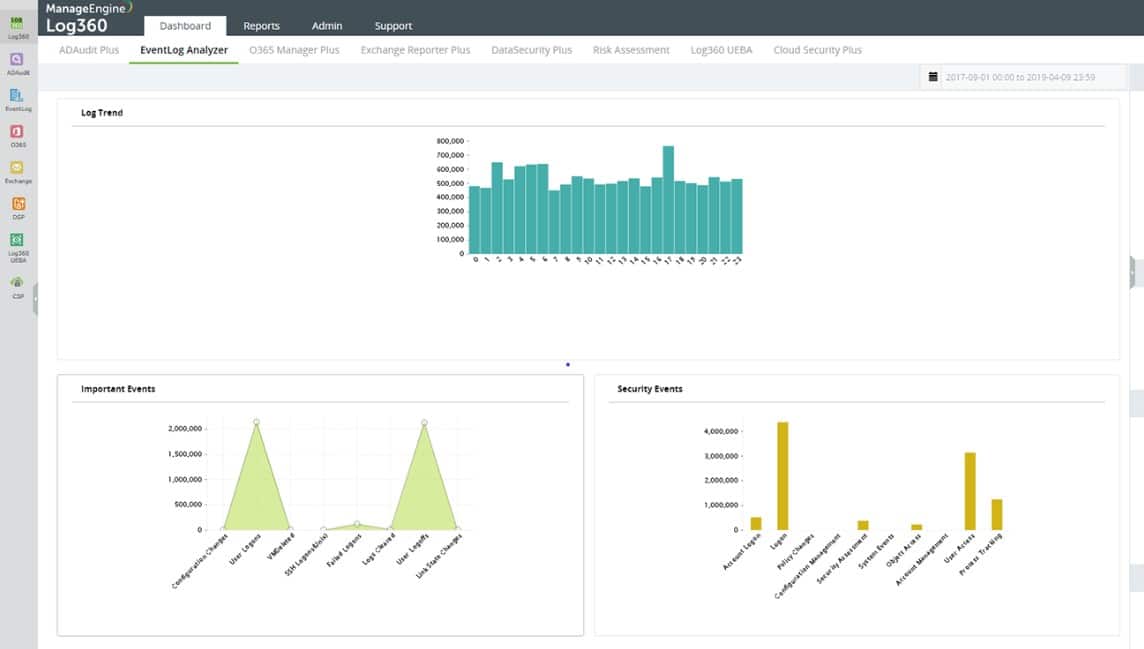
ManageEngine Log360 is a package of security systems that is centered on log management. The features in the bundle provide compliance with PCI DSS, FISMA, HIPAA, SOX, GDPR, and GLBA. The log manager receives and stores logs in files that are organized in a meaningful directory structure. This is an important service because log access for compliance auditing is a requirement of many data protection standards.
Key Features:
- Compliance auditing
- Threat intelligence feed
- File integrity monitoring
- Log consolidation
Why do we recommend it?
ManageEngine Log360 is a versatile tool for compliance with various regulations like PCI DSS and GDPR. Its comprehensive log management and threat-hunting capabilities make it an effective cybersecurity solution.
Those logs also provide a data source for a SIEM service. The SIEM is informed by a threat intelligence feed that provides details of the latest hacker attack campaigns. The Log360 SIEM is based around user and entity behavior analytics (UEBA). This examines activity per user and per device. The service is an AI-based machine-learning mechanism that derives a pattern of standard behavior. That baseline is constantly adjusted to reduce false-positive reporting.
Any activity that doesn’t fit into the pattern is flagged as an anomaly and that profiles an alert. The Log360 system is able to channel alerts through service desk systems as tickets for the attention of technicians. The tool works with ManageEngine ServiceDesk Plus, Jira, and Kayoko service desk systems.
Who is it recommended for?
Best for businesses requiring detailed log analysis and compliance auditing, particularly those managing extensive networks and cloud environments.
Pros:
- Comprehensive compliance auditing.
- Advanced threat-hunting capabilities.
- Extensive log management, including cloud platforms.
- File integrity monitoring against ransomware.
- Integrated SIEM with user and entity behavior analytics.
Cons:
- The broad scope and complexity may overwhelm smaller businesses.
ManageEngine Log360 installs on Windows Server and it is offered on a 30-day free trial.
EDITOR'S CHOICE
ManageEngine Log360 is our leading choice for compliance management, delivering an integrated approach to log management, security information, and event management (SIEM). It supports organizations that need to align with regulatory frameworks such as HIPAA, GDPR, and PCI-DSS by centralizing log collection, analysis, and reporting in one platform. A key strength is its set of pre-configured, compliance-specific reports, which simplify the process of producing audit-ready documentation. These reports track activity such as user access, data changes, and network modifications, while automated report generation reduces the manual effort involved in audit preparation. Custom reporting options are also available, allowing outputs to be tailored to specific regulatory or operational requirements. Real-time monitoring and alerting provide visibility into security events and potential compliance violations as they occur. Its correlation engine processes data from multiple sources to highlight suspicious patterns, potential threats, and gaps in compliance controls, supporting a more proactive approach to risk management.
Download: Get a 30-day free trial
Official Site: https://www.manageengine.com/log-management/download.html?log360-index
OS: Windows Server or SaaS
2. Check Point’s SASE (ACCESS FREE DEMO)

Check Point’s SASE, formerly Perimeter 81, offers a VPN-based connection security system that integrates access controls. This service implements Zero Trust Access (ZTA), which allocates access right on an application level. This system requires a new login event for each resource – a task that is completed automatically by a single sign-on package.
Key Features:
- Integrated connection protection
- Access event logs
- Feeds to SIEM
- Data loss prevention
Why do we recommend it?
Check Point’s SASE is recommended for its strong emphasis on security through its Zero Trust Access (ZTA) approach, which ensures that access rights are meticulously controlled at the application level. This VPN-based security solution, combined with single sign-on capabilities and detailed access logs, makes it a powerful tool for protecting both site-to-cloud and remote connections effectively.
The Check Point’s SASE package supplies VPNs to protect connections between sites and to cloud services. A key element is a client app that is used to protect connections from the endpoints of remote workers into the network. That network is not limited to a specific site but is generated as a virtual system by a hub that is run on the Check Point’s SASE cloud server.
Each user gets a list of permitted applications, which is built into the connection client. After logging into the app, authentication is flowed through to access for each resource. Connections channel through the Check Point’s SASE server, which re-authenticates requests, logs activity, and optionally examines transfer contents or blocks activities.
The logs that the Check Point’s SASE system creates can be fed through to a SIEM for live security analysis. Even without log analysis, the security policy feature of the system will examine each action and control access to data – particularly data transfers out of the system. Inbound traffic is examined by a cloud-based firewall service.
Who is it recommended for?
This tool is ideal for businesses of any size that require a secure, scalable VPN solution for connecting remote teams and securing cloud environments. Its Zero Trust framework and integration with single sign-on systems make it particularly suitable for organizations that prioritize stringent security measures and efficient user access management.
Pros:
- Zero Trust Security: Implements Zero Trust Access for enhanced application-level security.
- Single Sign-On Integration: Simplifies access with automatic login for each resource.
- Comprehensive Connection Protection: Offers VPNs for secure site-to-cloud and remote worker connections.
- Detailed Access Logs: Provides valuable insights with event logging and SIEM feeds.
- Data Loss Prevention: Employs robust measures to safeguard against data exfiltration.
Cons:
- Multiple Logins Required: Each resource access necessitates a new login, potentially impacting user convenience.
- Subscription Cost: Charges are based on a per-user subscription model, which may add up for larger organizations.
Check Point’s SASE is a SaaS package that is charged fr by subscription with a rate per user. Request a demo to assess the service.
3. Site24x7 (FREE TRIAL)

Compliance management is included among the monitoring functions provided by Site24x7. The service keeps watch over IT infrastructure on an ongoing basis so organizations can maintain alignment with regulatory requirements. It can be used in support of GDPR, HIPAA, PCI-DSS, and SOC 2 compliance. To automate that work, the platform follows security-relevant indicators such as data access activity, configuration settings, and system vulnerabilities.
Key Features:
- Device privileged account tracking
- Configuration management
- Device settings monitor
- Endpoint monitoring
Why do we recommend it?
Its compliance features are not isolated from the rest of the product. They sit inside a wider monitoring platform, allowing businesses to manage regulatory obligations without relying on manual checks alone. That lowers exposure to non-compliance and possible penalties, while also letting teams handle performance oversight and security monitoring in the same environment.
Automated audits are built into the platform, and reporting can be tailored to fit inspection or audit requirements. That makes it easier for organizations to present evidence of compliance when a formal review takes place.
To support that process, the service records the relevant information, including access logs, security configurations, and system changes, then turns those records into reports that provide a clear audit trail. This helps organizations demonstrate compliance with regulatory requirements while making audit preparation less time-consuming and more efficient.
Who is it recommended for?
The package is aimed at IT teams, security officers, and compliance managers in organizations of any size. It is especially relevant for regulated sectors such as healthcare, finance, and retail, where meeting standards such as GDPR, HIPAA, and PCI DSS while reducing compliance risk is a constant requirement.
Pros:
- Alerts for security violations
- Security policy enforcement
- Notifications for misconfigured settings
- Simultaneous performance and security monitoring
Cons:
- Only available as a cloud platform
By folding compliance management into the broader IT monitoring workflow, the platform reduces the operational effort involved in compliance tasks, improves security oversight, and gives businesses a more practical way to meet regulatory obligations. You can test the platform with a 30-day free trial.
4. ManageEngine EventLog Analyzer (FREE TRIAL)

ManageEngine EventLog Analyzer is a log analyzer and compliance management tool that can be used to monitor user activity and prepare for regulatory compliance. ManageEngine EventLog Analyzer includes compliance reports that comply with PCI DSS, FISMA, SOX, GLBA, ISO 27001, HIPAA, and GDPR. Reports can be customized according to your requirements.
Key Features:
- Log management
- Syslog management
- Compliance reports
- Real-time alerts
Why do we recommend it?
ManageEngine EventLog Analyzer is an effective tool for collecting and monitoring log data, with a strong focus on detecting cyberattacks and managing compliance.
As a log management solution, ManageEngine EventLog Analyzer allows you to take log data from over 700 sources, which you can use to identify and respond to security events. Monitoring your network in this way reduces the likelihood that you will be caught off guard by security events that put your data at risk.
Real-time alerts notify you via email and SMS when security events take place. Alerts can be prioritized by severity so that you respond to the most significant security risks first. There are over 500 alerts predefined out-of-the-box, but you can also create custom alerts as well.
Who is it recommended for?
Ideal for companies needing a comprehensive log management tool that offers customizable compliance reporting and real-time alerts.
Pros:
- Efficient log data collection and monitoring.
- Event correlation engine for cyberattack detection.
- Customizable compliance reports for various regulations.
- Real-time alert system with severity categorization.
Cons:
- Limited to five log sources in the free version; paid versions might be expensive.
ManageEngine EventLog Analyzer is worth taking a look at if you’re looking for a solution that helps manage security events as part of your compliance strategy. The free version supports up to five log sources. It is available for Windows and Linux. You can download the 30-day free trial.
5. MyEasyISO

MyEasyISO is a cloud-based compliance management software design for managing compliance for ISO 9001, ISO 14001, and ISO 45001. MyEasyISO offers document management that you can use to manage document approval and release, with version and access control.
Key Features:
- Manage compliance for ISO 9001, ISO 14001, 45001
- Document management system
- Alerts
- Live chat support
Why do we recommend it?
MyEasyISO offers a comprehensive cloud-based compliance management tool, particularly for ISO standards, with features like audit management and document control.
The internal audit management capabilities of MyEasyISO make it possible to track, create reports, auditing checklists, and track tasks so that you can prepare your company for compliance. You can also share reports with other users for review and approval (which is ideal for incorporating downstream feedback.)
To prepare for emergencies, you can use the platform to create and store remediation plans. Through a single tool, you can manage changes to the plans and update them to make sure that your employees know exactly what to do when an emergency takes place.
Who is it recommended for?
Recommended for businesses focusing on ISO compliance, needing a tool that offers a predefined library of compliance requirements and effective audit management.
MyEasyISO is worth taking a look at if you want to streamline your ISO compliance. Prices start at $29 (£23.27) per month for two users and one GB of File storage You can start the free trial here.
Pros:
- Specialized in ISO compliance management.
- Effective audit management capabilities.
- Comprehensive document management system.
- Useful for creating, distributing, and managing compliance documents.
Cons:
- Focused primarily on ISO standards, which may limit its applicability to other regulatory frameworks.
6. Netwrix Auditor
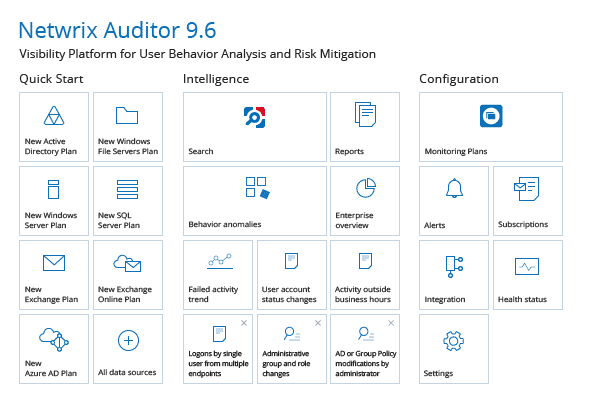
Netwrix Auditor is an auditing software that you can use to demonstrate regulatory compliance. Netwrix Auditor allows you to audit your environment and identify security gaps in your infrastructure. For example, if you’ve assigned too many permissions to users then you can detect this through the platform and take action to resolve the problem.
Key Features:
- Run risk assessments
- Audit systems rating from Active Directory to Oracle database
- Alerts
- Change management reports
Why do we recommend it?
Netwrix Auditor is an excellent auditing program for conducting risk assessments, offering insights into a wide array of compliance risks.
The platform can audit systems including Active Directory, Azure AD, Office 365, Exchange, SharePoint, Nutanix Files, Windows File Servers, NetApp, Oracle Database, SQL Server, Windows Server, and more. Creating an audit trail for these systems ensures that you’re prepared if you go through an audit.
If a threat is detected in your infrastructure then NetWrix Auditor will send you an alert. For example, if suspicious activity is discovered the program will notify you so you can investigate the problem before there is a data breach. You can also generate change, access, and configuration reports to prepare for audits.
Netwrix Auditor is a solution aimed at enterprises that want to prepare to be audited and ensure IT security is up to scratch. To view pricing information you need to request a quote from the company directly. You can start the 20-day free trial from this link here.
Who is it recommended for?
Best suited for large enterprises that need to manage security risks proactively and prepare comprehensively for audits.
Pros:
- Detailed risk assessments with categorized risk levels.
- Automated alerts for suspicious activities.
- Helps manage different compliance risks efficiently.
- Suitable for a variety of regulatory frameworks.
Cons:
- Pricing starts at a higher range, potentially limiting smaller businesses.
7. Workiva Wdesk
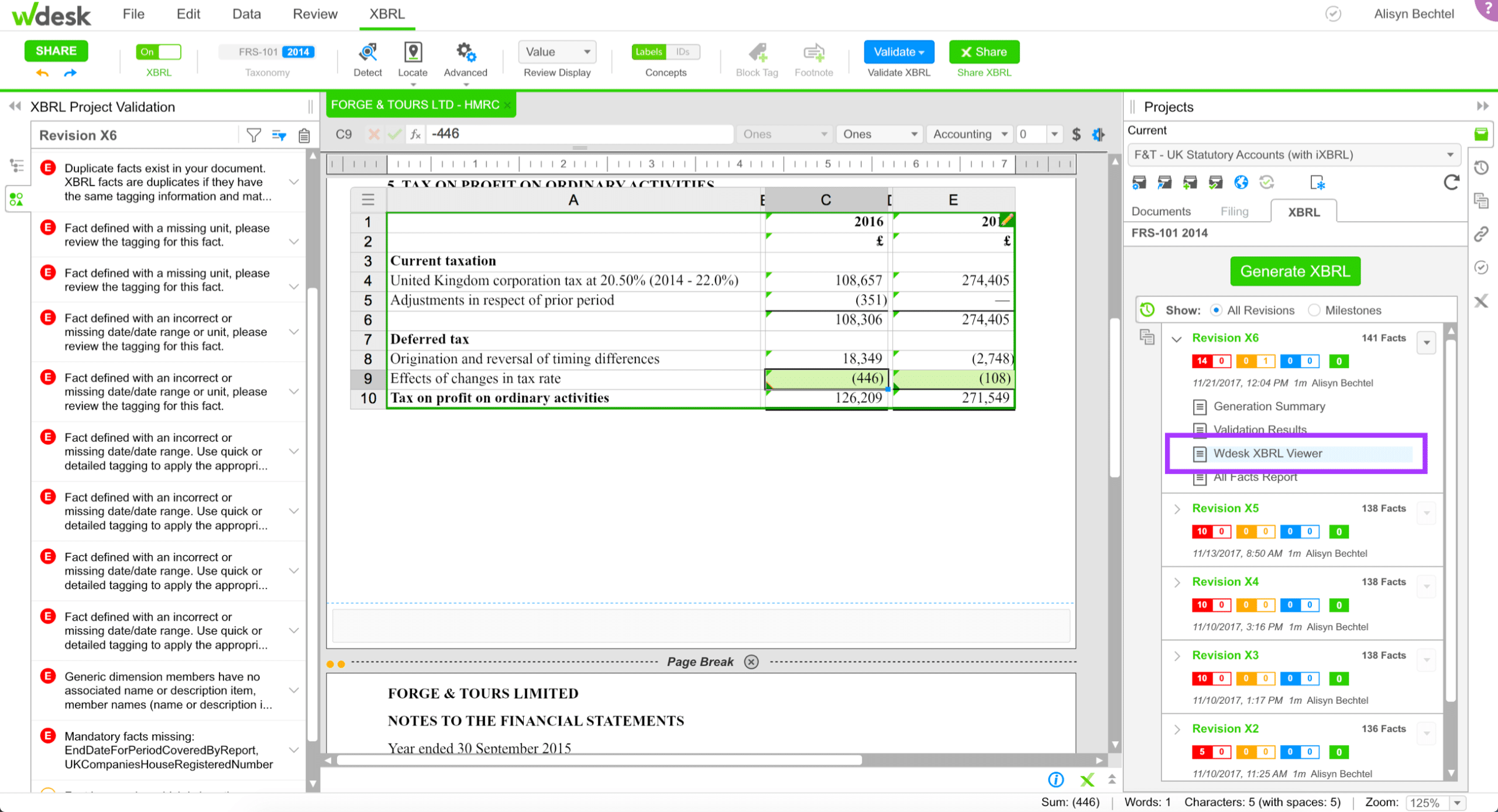
Workiva Wdesk is a compliance management solution that’s designed to streamline the process of reporting and regulations. A user can take data from ERP and spreadsheets and then use Workiva Wdesk to create reports, documents, and presentations. Through one platform users can collaborate on reports. The software can be used to prepare for SOX compliance.
Key features:
- SOX compliant
- Generate reports
- Create documents and presentations
- Workflow and task management
Why do we recommend it?
Workiva Wdesk excels in cloud-based compliance and reporting, enabling seamless collaboration on sensitive documents with secure data linking and task workflows.
The platform offers a high degree of transparency over changes made to documents. You can see where data originated from and the users who have interacted with it. This makes sure that all the changes made are legitimate and provides you with an audit trail to look back over.
Workflow and tasking let users assign approvals to other users. Workflows enable employees to streamline the management of compliance gaps more efficiently with less time-consuming manual legwork.
Workiva Wdesk is a good solution for enterprises that want to take a more organized approach to manage performance issues. For pricing information, you need to request a quote from the company directly. You can schedule a demo from this link here.
Who is it recommended for?
Ideal for large enterprises that require a secure, collaborative platform for managing compliance documentation and reporting.
Pros:
- Advanced document and spreadsheet linking.
- Version history tracking for document changes.
- Secure collaboration with user permission settings.
- Suitable for managing sensitive compliance documents.
Cons:
- Requires direct contact for pricing, which might indicate a higher cost structure.
8. AuditBoard

AuditBoard is an audit management tool that you can use to monitor risks throughout your environment. Through a single platform, you can create a record of regulatory requirements and control frameworks for regulations including PCI DSS, SOX, GDFPR, NIST, ISO, and more.
Key Features:
- Centralized repository of regulatory frameworks
- Perform assessments
- Issue management
- Dashboards
- Reports
Why do we recommend it?
AuditBoard is an advanced tool for managing audits, risks, and compliance, offering functionalities like creating control frameworks and running risk assessments.
You can also assess the audit readiness of your environment with assessments. Creating assessments allows you to identify vulnerabilities within your organization. When you find an issue, you can use issue management to remediate it.
Issue management allows you to identify an issue alongside a description and to assign to a remediation owner. The remediation owner will be responsible for addressing the issue and resolving it and safeguarding your compliance status. You can also monitor issues through dashboards and reports.
Who is it recommended for?
Suitable for enterprises needing a centralized platform for comprehensive risk assessments and compliance management.
Pros:
- Comprehensive risk assessment capabilities.
- Issue management and workflow automation.
- Role-based dashboards for efficient task division.
- Streamlines resolution of compliance issues.
Cons:
- Pricing information not readily available; may be expensive for smaller companies.
AuditBoard is a compliance management tool fit for enterprises that require a centralized tool for storing and managing regulatory requirements. To view pricing information, you need to request a quote from the company directly. You can schedule a demo from this link here.
9. SolarWinds Security Event Manager

SolarWinds Security Event Manager is a SIEM tool that you can use for risk management. SolarWinds Security Event Manager enables you to collect log and event data so you can detect threats, vulnerabilities, and compliance violations. For example, the software can automatically detect anomalous activity and respond automatically.
Key Features:
- Centralized log collection
- Monitor user activity
- Notifications
- Alert correlation rules
- Compliance reports
Why do we recommend it?
SolarWinds Security Event Manager is recommended for its comprehensive approach to event log management. It enables real-time monitoring of IT system logs, helping identify security events and user activities efficiently.
The platform proactively manages risks throughout your environment with automated notifications. Notifications trigger email alerts and notify you about performance issues and security events. You can also configure automated responses such as blocking an IP or resetting a user’s password.
There are also compliance reports. Compliance reports enable you to gather information for auditing for regulations including PCI DSS, HIPAA, SOX, GLBA, NERC CIP, and more. The platform includes out-of-the-box templates by default, but you can customize these if you require it.
Who is it recommended for?
Ideal for enterprises seeking a robust solution for centralized log management, especially useful for compliance with regulations like HIPAA, SOX, and PCI DSS.
SolarWinds Security Event Manager is worth taking a look at if you want to secure your environment against threats and work toward regulatory compliance. Prices start at $2,525 (£2,025). Software agents are available for Windows, macOS, and Linux. You can download the 30-day free trial.
Pros:
- Centralized log management across the network.
- Customizable report templates for compliance.
- Real-time event correlation for security.
- Automated responses to security threats.
- Alert system to keep track of security events.
Cons:
- Complexity and cost may be prohibitive for smaller organizations.
10. LogicGate Risk Cloud
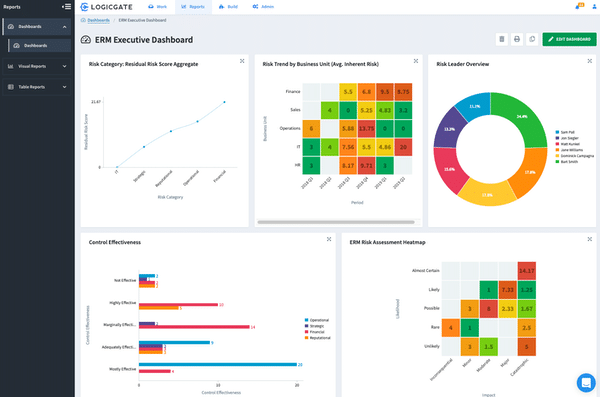
LogicGate Risk Cloud is a risk and audit management tool that you can use to identify compliance gaps. With LogicGate Risk Cloud, you can import regulatory controls and frameworks for a range of regulations including HIPAA, PCI DSS, and SOC 2. You can also create audit and control process templates with predefined settings.
Key Features:
- Create audit and controls process templates
- Import controls and frameworks for HIPAA, PCI DSS, and SOC 2
- Audit workflows
- Automated reminders
Why do we recommend it?
LogicGate Risk Cloud offers a powerful GRC platform for mitigating security risks, with features like conditional task workflows and customizable reports.
Regulatory frameworks are automatically updated so you have an up-to-date view of the requirements, reducing the risk of non-compliance. To manage compliance tasks you can use an audit workflow to automatically assign evidence requests to employees.
There are also automated reminders that notify users when they need to take action to address compliance tasks. You can also create reports to demonstrate the status of audit and control assessments to create a record of addressing compliance issues.
LogicGate Risk Cloud is ideal for enterprises that need a simple risk management tool for identifying compliance gaps. The pricing depends on the number of users, whether it’s a single app or not, and where it’s deployed. You need to request a quote for pricing information. You can request a demo from this link here.
Who is it recommended for?
Recommended for enterprises looking for a robust risk management tool that centralizes compliance procedures and automates task prioritization.
Pros:
- Conditional workflows for efficient task management.
- Comprehensive dashboards for monitoring compliance.
- Customizable reports for auditing and risk analysis.
- Focuses on prioritizing severe risks for remediation.
Cons:
- May require direct contact for pricing information, suggesting higher costs.
11. OnSpring Audit Management Software
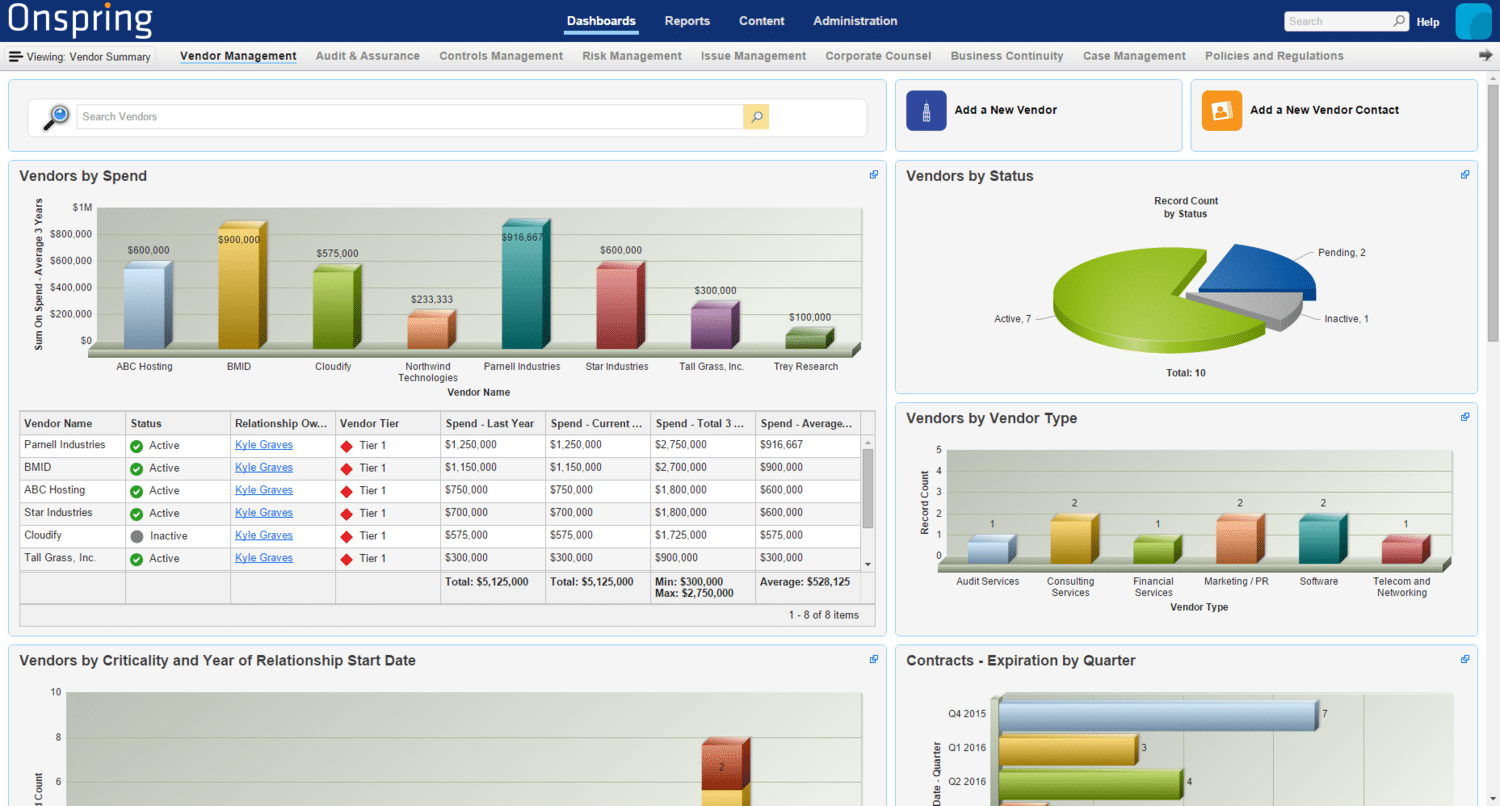
Onspring Audit Management Software is an auditing management tool you can use to monitor risks within your organization. With Onspring Audit Management Software you can audit your environment for risks with automated risk assessments or manage found vulnerabilities through live dashboards.
Key Features:
- Audit environment for risks
- Live dashboards
- Issue management
- Auto-reminders
- Reports
Why do we recommend it?
Onspring Audit Management Software is highly recommended for its comprehensive suite of risk-auditing features, including automated risk assessments and effective issue management. The software’s live dashboards provide real-time visibility into compliance and risk status, enhancing decision-making and operational efficiency.
Issue management allows you to monitor risks and receive auto-reminders when you need to take action to remediate a vulnerability. Individual team members can use the My Agenda view to prioritize auditing tasks helping them to prepare for regulatory compliance more easily.
You also have the ability to generate Word and PDF reports. Reports can be sent directly to your email. In addition, you can use the platform to automatically pull and format content from OnSpring apps including Auditable Entities, Projects, Findings, and Remediation Plans to view a more holistic perspective of your compliance status.
Who is it recommended for?
This tool is particularly suited for enterprise-level organizations that need robust auditing capabilities to monitor and manage risks comprehensively. It is ideal for teams requiring detailed reporting and prioritization of audit tasks to ensure regulatory compliance and effective vulnerability management.
Pros:
- Risk Auditing: Facilitates environment risk assessments with automated tools.
- Real-Time Dashboards: Offers live monitoring of risks and compliance through dashboards.
- Effective Issue Management: Helps in tracking vulnerabilities and setting auto-reminders for remediation.
- Task Prioritization: Enables team members to efficiently organize auditing tasks.
- Comprehensive Reporting: Generates detailed Word and PDF reports for thorough compliance analysis.
Cons:
- Price Transparency: Requires direct contact for pricing details, lacking upfront cost information.
- Enterprise Focused: Mainly tailored for enterprise users, possibly limiting accessibility for smaller organizations.
Onspring Audit Management Software is a tool that delivers a solid basic audit management experience for enterprise users. To view pricing information, you have to request a quote from the company directly. You can schedule a demo from this link here.
12. Compliancy Group HIPAA Compliance Software

Compliancy Group HIPAA Compliance Software is a compliance management solution aimed specifically at HIPAA compliance. With Compliancy Group HIPAA Compliance Software you can complete six HIPAA assessments: Security, Administrative, Technical, Physical, Privacy, and Device.
Key Features:
- Six HIPAA assessments
- Manage security events
- Digital training
- Verify compliance with HIPAA seal of approval
- Breach Support
Why do we recommend it?
Compliancy Group HIPAA Compliance Software is a dedicated tool for managing HIPAA compliance, offering features like six different compliance assessments and breach support.
If your environment is deemed compliant then you can use the HIPAA Seal of Compliance on your website to demonstrate your compliance. In the event that there are compliance gaps you can use the software to manage security events.
In addition, if your data becomes compromised and there’s a data breach, Compliancy Group’s Breach Support will provide you with compliance coaches to help you remediate and prepare for OCR investigations.
To help increase your team’s knowledge of regulatory requirements, Compliancy Group HIPAA Compliance Software allows you to track employee training. Reports allow you to check up on an employee’s completion status so you know how familiar they are with the security controls that need to be in place to protect your data.
Who is it recommended for?
A perfect fit for healthcare organizations and businesses that need to comply with HIPAA regulations comprehensively.
Compliancy Group HIPAA Compliance Software is suitable for enterprises looking for a simple solution to manage HIPAA compliance. To view pricing information you need to contact the company to request a quote. You can sign up for the demo from this link here.
Pros:
- Offers six detailed HIPAA compliance assessments.
- Tracks and reports security incidents effectively.
- Offers a HIPAA compliance seal of approval for websites.
Cons:
- Solely focused on HIPAA compliance, which may not suit organizations with broader compliance needs.
Choosing Compliance Management Software
Having the ability to identify and remediate compliance gaps is essential for meeting the regulatory requirements in your industry. The only way to know if your environment is compliant is if you’re constantly reevaluating your controls and searching for vulnerabilities. Even finding a vulnerability is just the tip of the iceberg, because you still need to fix it.
Compliance management tools like SolarWinds Security Event Manager, ManageEngine Log360, and ZenGRC can all help you to achieve compliance. If you’re looking to detect security events and generate compliance reports SolarWinds Security Event Manager and ManageEngine EventLog Analyzer are a good place to start.
If you want more of a general control and risk management experience then ZenGRC is worth evaluating. However, we recommend conducting independent research before committing to a purchase to ensure that you find the tool that’s right for your environment.