Job scheduling is of the utmost significance for companies, particularly large-scale ones that are comprised of a significant number of staff members. They can assist both simple and complicated workflows and help automate IT processes that operate during processing intervals known as batch windows. In this article we take a look at the best batch scheduling tools on the market.
Here is our list of the best batch scheduling tools:
The following list provides an outline of the primary characteristics of each tool. If you’re short on time, take a look at this streamlined rundown of the top batch scheduling software.
- ActiveBatch (GET DEMO) A system that helps customers automate and manage batch processes. It is a workload automation and enterprise task scheduling tool. Start a free demo.
- Redwood RunMyJobs (GET DEMO) The tool will generate a script based on the diagram, and that script will be part of a batch that can be set to run based on a timetable or an event trigger. Get a free demo.
- ManageEngine RMM Central (GET DEMO) stands out as a comprehensive IT management solution that simplifies the monitoring and management of diverse IT environments. It’s particularly valued for its robust integration capabilities and user-friendly interface. Get a free demo.
- JAMS Scheduler Centrally monitors the status of all jobs, provides notifications of failure (or success), and maintains a detailed audit trail and log of every execution.
- Activeeon Batch Scheduling Provides functionality for additional resources such as the migration of data, synchronization of processes, optimization of resource consumption, and so on.
- VisualCron Creates solutions that are tailored to the specific characteristics that each client requires. It is compatible with the Windows operating system.
- ConnectWise Automate Provides businesses with the ability to track and manage their IT assets from a central location.
- Atera Assists managed IT, service providers, in expanding their businesses while maintaining their status as suppliers of the best service possible.
- Turbonomic Application Resource Management Comprehensive package of usefulness that includes network, on-premises, cloud, and application administration, as well as excellent cloud management capabilities
Batch scheduling software helps automate IT activities that function in these processing periods. Batch scheduling software has been available for many years and was initially used in mainframes to process massive amounts of data at once. Because early mainframes only had a limited amount of computing capabilities, it was necessary to optimize those resources to do the most amount of work in the shortest amount of time.
The Best Batch Scheduling Tools
The batch scheduling software that is most suitable for your business will be determined by the needs of that organization; nevertheless, in general, batch scheduling software possesses a few significant advantages, and are mentioned below:
1. ActiveBatch (GET DEMO)
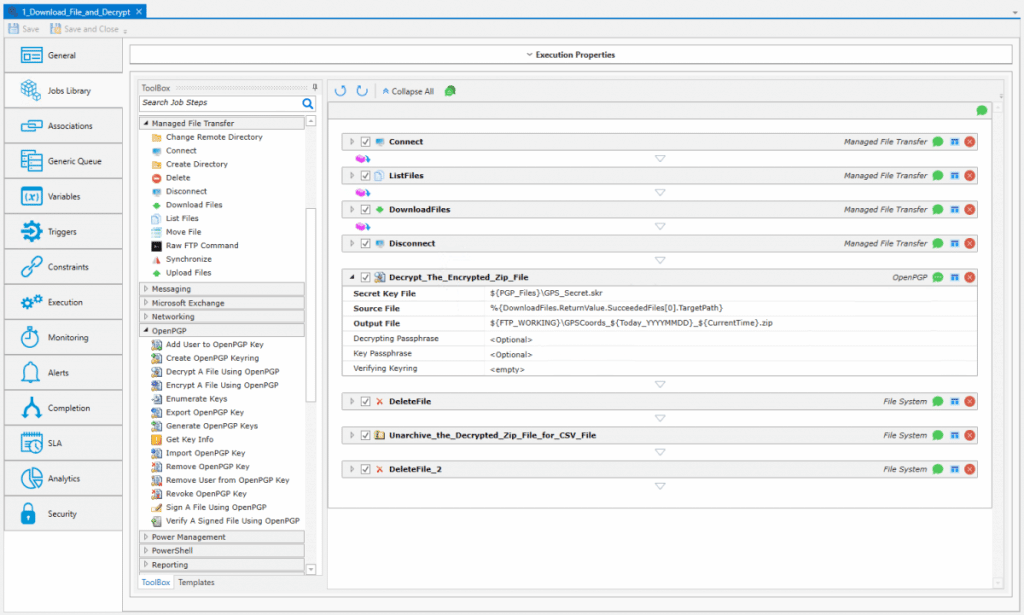
ActiveBatch is a workflow management solution that can be deployed in the cloud or on-premise and is focused on assisting enterprises in the implementation of low-code IT workflow automation. With event automation and job scheduling, resource optimization, security and audit management, analytics, and customizable alerts, the amount of time it takes to manage workflow and business processes can be cut in half.
Key Features:
- Granular Scheduling Options: Offers highly customizable scheduling, including specific time intervals, business calendars, and time zone management.
- Event-Driven Automation: Automatically launches tasks based on real-time triggers like file changes, system events, or incoming emails.
- Integrated Jobs Library: Includes a wide range of prebuilt job steps to connect systems without needing to write complex scripts.
- Low-Code Drag-and-Drop Interface: Makes it easy to build workflows using a visual editor, ideal for reducing development time.
- Cross-Platform Support: Supports automation across Windows, Linux, and UNIX environments, making it flexible for hybrid IT ecosystems.
Why do we recommend it?
ActiveBatch stands out as a top-tier workflow management solution by offering a comprehensive set of features focused on low-code IT workflow automation. The platform excels in simplifying workflow creation with prebuilt, drag-and-drop job steps, eliminating the need for extensive coding. With robust capabilities such as cloud and virtual resource deployment, machine resource optimization, and granular scheduling, ActiveBatch streamlines the management of complex business processes. Its support for real-time processing, event triggers, and mobile access further enhances its versatility and efficiency.
Granular date/time scheduling for different time zones and custom calendars ensure that data and reports are provided on time. Dozens of event triggers support real-time processing, with limits to prevent processes from being left unfinished.
ActiveBatch Mobile Ops, which is compatible with both iOS and Android devices, enables users to access ActiveBatch while they are on the move. Additionally, this solution supports multi-factor authentication (also known as MFA) for all of ActiveBatch’s user interfaces and is compatible with the vast majority of authenticator apps.
Using out-of-the-box, pretested, drag-and-drop Job Steps, you can assemble end-to-end workflows in less than half the time it would normally take. Because of this, developers can concentrate more on the functions of workflows and integrations than on the coding that underpins them.
Who is it recommended for?
ActiveBatch is highly recommended for enterprises seeking an advanced workflow management solution with a strong emphasis on low-code automation. It caters to users who prioritize ease of use and quick implementation, allowing them to focus on the functional aspects of workflows and integrations rather than intricate coding. The platform’s scalability, support for multi-factor authentication, and compatibility with various devices make it suitable for businesses with diverse automation needs. ActiveBatch is ideal for organizations looking to optimize resource utilization, enhance security, and efficiently manage workflows across multiple platforms.
Pros:
- User-Friendly Interface: The visual design helps users easily create and manage workflows without needing deep technical expertise.
- Reliable Performance: Handles task execution consistently, minimizing downtime or failures in batch processes.
- Responsive Customer Support: Provides strong support with quick response times and effective issue resolution.
- Comprehensive Monitoring: Offers detailed insights into job status and performance, allowing for real-time visibility and control.
Cons:
- Steep Learning Curve: The range of features and customization options can be overwhelming for new users.
Register for a free demo.
2. Redwood RunMyJobs (GET DEMO)

Redwood RunMyJobs is a Workflow Lifecycle Automation (WLA) tool that enables information technology teams to schedule and run essential event-driven workloads, manage file transfers and data, and orchestrate across applications and other automation tools such as robotic process automation (RPA). IT can eliminate gaps in performance and operational workarounds by leveraging a single WLA platform. RunMyJobs integrates with SAP’s latest technologies, supporting mission-critical processes, and holds Premium certified SAP Endorsed App status.
Key Features:
- Flexible Scheduling: Enables precise scheduling with support for various intervals, business calendars, and time zones.
- Event-Driven Automation: Triggers workflows based on real-time events such as file transfers, data changes, or messages.
- Low-Code Development: Features a drag-and-drop interface with templates and wizards, simplifying workflow creation.
- Extensive Scripting Support: Supports over 25 scripting languages, including Python, R, and PowerShell, with built-in syntax highlighting.
- Cross-Platform Integration: Seamlessly integrates with various systems, including SAP and Oracle, for end-to-end process automation.
Why do we recommend it?
Redwood RunMyJobs is a robust Workflow Lifecycle Automation (WLA) tool that sets itself apart with its comprehensive capabilities in scheduling, managing event-driven workloads, orchestrating applications, and handling file transfers and data. The platform excels in live progress monitoring, incorporating SLA tracking, and providing a user-friendly interface for creating reusable automation through low-code wizards and drag-and-drop functionality. With the ability to initiate activities based on real-time events and seamless parallel processing, RunMyJobs streamlines complex batch workflows, ensuring operational efficiency and eliminating gaps in performance.
Creating a process flow diagram, which depicts the general layout of the batch work, is done through the system’s graphical user interface, which makes using the system straightforward. It is possible to run many process branches in parallel to provide multiple possible sequences.
It is necessary to provide specific information for each step in the diagram, including the name of the application that should be started as a result of that step. You can automate your batch workflows by creating reusable templates with the help of RunMyJobs. In addition, the intuitive user interface of Redwood, which consists of a drag-and-drop workspace and a clickable toolbar, makes it simple to rapidly build new processes.
Automating FTPs through enterprise job scheduling, automating data warehousing and business intelligence processes end-to-end, and automating the passing of data and managing dependencies between applications are some of the automation strategies that businesses should implement to ensure SLA and save money.
Who is it recommended for?
Redwood RunMyJobs is recommended for information technology teams and businesses seeking a versatile WLA tool to automate essential processes seamlessly. The platform is ideal for organizations with diverse automation needs, including scheduling, managing file transfers, and orchestrating applications. Its intuitive interface and low-code capabilities make it accessible for users who prioritize ease of use and rapid process development. Businesses aiming to automate FTP processes, data warehousing, business intelligence processes, and effectively manage dependencies between applications will find RunMyJobs a valuable solution to meet SLAs and optimize cost savings.
Pros:
- User-Friendly Interface: The intuitive design simplifies navigation and workflow creation.
- Scalability: Efficiently manages high-volume job scheduling across complex IT environments.
- Reliable Performance: Consistently executes scheduled tasks, ensuring operational stability.
- Responsive Customer Support: Offers prompt assistance and effective issue resolution.
Cons:
- High Cost: The pricing may be prohibitive for small businesses.
- Complex Implementation: Initial setup and configuration can be challenging without technical expertise.
With RunMyJobs, pricing is flexible and transparent, built around a single platform fee and optional add-ons for additional capabilities or capacity. This model allows you to control costs while scaling automation to meet your organization’s needs. Register for the free demo.
3. ManageEngine RMM Central (GET DEMO)

ManageEngine RMM Central is an all-encompassing IT management solution designed to streamline and secure the monitoring and management of endpoints, networks, and servers across various platforms. It targets businesses aiming to consolidate their remote monitoring and management needs into a single, unified platform.
Key Features:
- Centralized Management: RMM Central provides a single dashboard from which all devices and networks can be monitored and managed, promoting efficiency and reducing the complexity typically associated with managing IT environments across multiple locations and platforms.
- Comprehensive Monitoring: The solution offers robust monitoring capabilities that allow IT administrators to keep a close eye on the health and performance of their IT infrastructure. This includes real-time alerts and detailed reporting features that help in proactive management and decision-making.
- Automated Patch Management: Ensuring that all systems are up-to-date, RMM Central automates the patch management process, reducing the risk of vulnerabilities and freeing up IT staff to focus on more critical tasks.
- Remote Access: IT staff can remotely access any device within the network, facilitating quick resolutions to issues without the need for physical presence, which is particularly beneficial for supporting remote work environments.
- Security Features: With built-in security management features, RMM Central helps protect networks and devices from various threats. This includes managing firewalls, antivirus solutions, and providing comprehensive security reports.
Why do we recommend it?
ManageEngine RMM Central stands out for organizations seeking a unified solution that handles not just remote monitoring but also efficient task scheduling across endpoints. Its automation features, including patch deployment and script-based task execution, make it a capable choice for managing scheduled batch operations in IT environments. It also provides a centralized dashboard that gives visibility into all scheduled tasks, improving oversight and reducing manual intervention. With its wide compatibility across platforms and integrated IT asset management, it’s a practical tool for MSPs and IT admins who need more control over their scheduling workflows.
Users generally appreciate RMM Central for its intuitive user interface, which makes it easier to deploy and manage without a steep learning curve. New users can navigate through its comprehensive set of tools with relative ease, thanks to clear labeling and logical organization of features.
RMM Central boasts impressive integration capabilities, seamlessly working with popular operating systems and third-party applications. This flexibility ensures that businesses can integrate it into their existing environments without significant disruptions.
Who is it recommended for?
This tool is best suited for managed service providers (MSPs), mid-sized IT teams, and enterprises that require automated task execution and centralized batch scheduling. It’s ideal for those managing diverse networks who want to streamline routine operations like patching, software rollouts, and system maintenance. RMM Central is particularly helpful for organizations operating with hybrid environments, as it offers visibility and control across different device types. IT departments looking to scale their automation capabilities without jumping into overly complex platforms will find this tool a strong fit.
Pros:
- User-Friendly Interface: The intuitive design simplifies navigation and operation, reducing the learning curve for new users.
- All-in-One Solution: Combines multiple IT management tools into a single platform, streamlining operations and reducing the need for multiple disparate systems.
- Scalable Architecture: Capable of managing networks of varying sizes, making it suitable for both small businesses and large enterprises.
- Robust Security Features: Includes functionalities like patch management and compliance tracking to enhance the security posture of managed networks.
Cons:
- Complex Initial Setup: The extensive feature set may require a considerable time investment during the initial configuration and deployment phases.
- Variable Customer Support: Some users have reported inconsistencies in the responsiveness and effectiveness of customer support services.
RMM Central is a robust tool that caters well to the needs of small to medium-sized enterprises looking for a comprehensive IT management solution. Its ability to centralize control, coupled with powerful automation and security features, makes it a valuable asset for any IT department. Register for the free demo.
4. JAMS Scheduler

JAMS is an enterprise workload automation solution that manages IT processes, ranging from straightforward batch processes and scripts to cross-platform workflows that integrate jobs running on multiple servers and business applications. JAMS can manage these processes at any level of complexity, from the simplest to the most complex.
Key Features:
- Centralized Job Management: Offers a single console to define, schedule, and monitor all jobs, streamlining workflow oversight.
- Event-Based Scheduling: Executes jobs in response to specific events like file arrivals or system alerts, boosting real-time automation.
- Cross-Platform Integration: Supports automation across Windows, UNIX, Linux, and major enterprise systems for maximum flexibility.
- Robust Security Controls: Includes granular permissions and authentication options to secure automated processes.
Why do we recommend it?
JAMS Scheduler stands out as an enterprise workload automation solution that adeptly manages IT processes, offering a wide spectrum of capabilities from handling straightforward batch processes to orchestrating complex cross-platform workflows. Its strength lies in providing the ability to seamlessly integrate operations across diverse applications and platforms, ensuring centralized scheduling for batch processes. JAMS excels in maintaining a centralized repository of job definitions, facilitating efficient review, modification, and tracking of job definitions. With dedicated integrations for various SAP applications and systems, JAMS offers a robust solution for businesses seeking comprehensive workload automation.
Maintaining a centralized repository of job definitions is made easier with JAMS Scheduler’s assistance. It provides a unified platform for the safe execution of multiple tasks at once and the consolidation of job monitoring.
You may define, schedule, carry out, and monitor jobs from a single centralized console using JAMS. JAMS is capable of automating jobs on any platform, including Windows, Linux, UNIX, and OpenVMS. It also has native application integrations, which allow processes to be run that are particular to databases, business intelligence tools, and enterprise resource planning systems.
These issues arise when businesses try to automate these processes with a collection of homegrown tools. After jobs have been centralized and managed in JAMS, IT teams can have peace of mind knowing that JAMS is managing workflows across platforms. Its extensive automation features enable you to run jobs on any schedule, as well as trigger off the completion of other events.
Who is it recommended for?
JAMS Scheduler is recommended for enterprises and IT teams dealing with diverse and complex IT processes. The platform is suitable for businesses of varying sizes, offering scalability to accommodate processes of any complexity level. It is particularly beneficial for organizations seeking centralized job management, streamlined scheduling, and monitoring across different platforms, including Windows, Linux, UNIX, and OpenVMS. JAMS is an ideal choice for those looking to automate jobs with native integrations for databases, business intelligence tools, and enterprise resource planning systems. Businesses striving to overcome the challenges of using disparate tools for automation will find JAMS Scheduler to be a robust and comprehensive solution.
Pros:
- Flexible Automation: Adapts to both simple and complex task automation needs across multiple systems.
- Scalability: Handles growing workloads efficiently without sacrificing performance or speed.
- PowerShell Integration: Works seamlessly with PowerShell, enhancing automation in Windows-heavy environments.
- Reliable Performance: Consistently delivers stable and accurate execution of scheduled tasks.
Cons:
- Complex Initial Setup: First-time configuration can be time-consuming and may require experienced IT personnel.
- Steep Learning Curve: Mastering all features may take time due to the system’s depth and flexibility.
- Limited Search Functionality: Locating specific jobs or logs can be difficult without enhanced search tools.
5. Activeeon Batch Scheduling

Activeeon is an open-source solution for workload automation and batch scheduling. It has features that may automatically retrieve additional resources, migrate data, synchronize operations, and maximize the consumption of resources, among other things. It includes a workflow UI that is simple to use.
Key Features:
- Workflow Studio: Visual interface for building and managing complex workflows with advanced features like loops, conditions, and parallel execution.
- Event-Based Automation: Triggers tasks in response to real-time events, improving reaction time and automation flexibility.
- Hybrid Infrastructure Support: Runs workloads seamlessly across on-prem, private, and public cloud environments.
- Self-Healing Capabilities: Detects job failures and reroutes tasks automatically to maintain workflow continuity.
- Resource Elasticity: Dynamically adjusts resource usage based on current workload demands to improve efficiency.
Why do we recommend it?
Activeeon Batch Scheduling emerges as a commendable open-source solution for workload automation and batch scheduling. With a robust set of features, it offers automated resource retrieval, data migration, operation synchronization, and efficient resource utilization. Particularly noteworthy is its capability to seamlessly integrate with multiple clouds, catering to both hybrid and cloud-native environments. The web-based user interface, supporting various languages, ensures user-friendly interaction. Activeeon’s time-based and event-based scheduling options, along with prefabricated connection points for diverse databases, including Oracle, make it a versatile and comprehensive solution for batch scheduling. The tool’s focus on notifications and alerts based on events enhances its utility for proactive monitoring and management.
Activeeon offers a straightforward dashboard that makes it simple to locate work statuses and update job priorities in a short amount of time. This consists of a log panel-board for task output visualization that gives users the ability to filter through any logs to locate problems.
Desktop agents and the ability to transmit files are further capabilities offered by Activeeon. Workflows that help you scale in a matter of minutes and optimize resource use can be created with the assistance of this tool.
You will find that Activeeon is one of the most helpful tools for batch scheduling in your arsenal. It has a plethora of capabilities that can assist you with the transfer and synchronization of data in your organization. In addition to this, Activeeon helps maximize the usefulness of all of the resources that are already there in your system by optimizing their resourcefulness.
Who is it recommended for?
Activeeon Batch Scheduling is recommended for organizations and IT teams dealing with diverse workloads and batch processes. It caters to businesses of varying sizes, offering flexibility and scalability. This solution is particularly beneficial for those operating in hybrid or cloud-native environments, seeking an open-source tool with granular distribution of computing resources. The web-based interface, multi-language support, and pre-built connectors for popular databases make it suitable for a wide range of users. Activeeon is an ideal choice for businesses looking to optimize resource utilization, automate data transfer, and synchronize operations efficiently within their organization.
Pros:
- Intuitive User Interface: The drag-and-drop Workflow Studio makes it easier to design and manage batch processes.
- Versatile Deployment: Works across multiple environments, from local servers to cloud platforms, offering deployment flexibility.
- Robust Automation Features: Supports both traditional and event-driven scheduling, making it adaptable to diverse needs.
- Scalability: Capable of handling workloads at large scale without sacrificing performance.
Cons:
- Complex Initial Setup: Initial deployment can be time-consuming and may require advanced IT skills.
- Limited Community Support: Fewer forums, third-party tools, and tutorials compared to more established platforms.
6. VisualCron
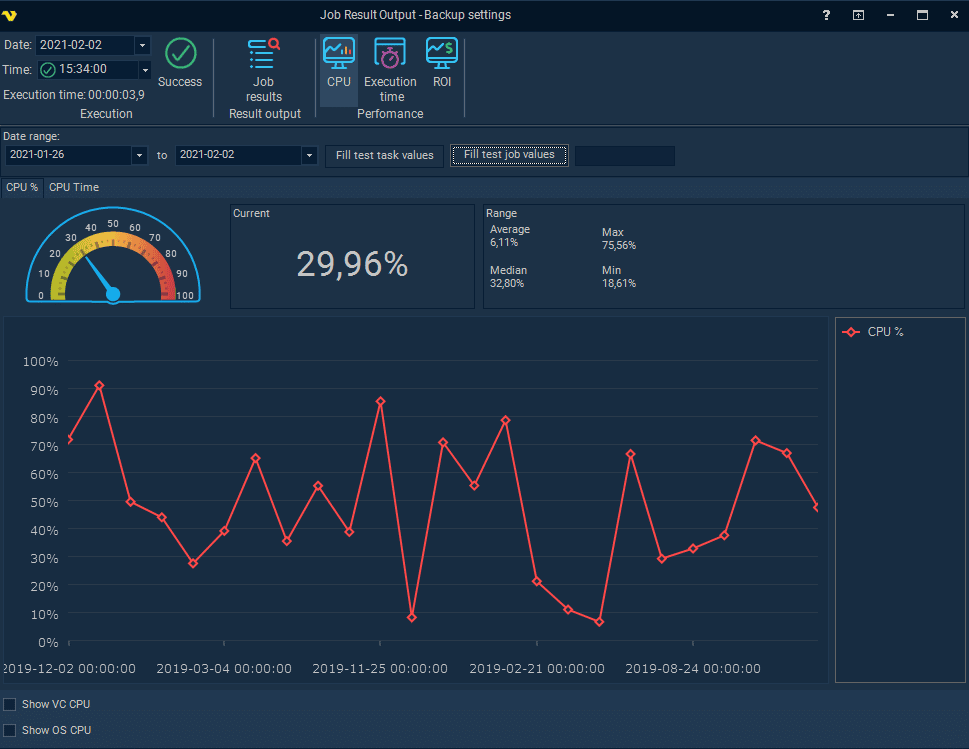
VisualCron is software for process automation that was developed to assist businesses in automating formerly manual activities such as data management, auditing, task scheduling, and many more. An integrated task scheduler provides managers with the ability to create tasks, assign them to members of the team, and generate reports to evaluate team members’ performance.
Key Features:
- Comprehensive Task Automation: Automates a wide range of tasks, including file operations, database queries, and system commands, enhancing operational efficiency.
- Event-Driven Triggers: Initiates jobs based on specific events such as file changes, system performance metrics, or custom-defined conditions, ensuring timely task execution.
- Integrated API Connectivity: Facilitates seamless integration with various APIs, enabling automated interactions between different software systems.
- Secure Credential Management: Stores and manages credentials securely, allowing for safe execution of tasks that require authentication.
- Detailed Logging and Error Handling: Provides extensive logging capabilities and customizable error-handling mechanisms to aid in troubleshooting and ensure process reliability.
Why do we recommend it?
VisualCron stands out as an exceptional software solution for process automation, catering to businesses aiming to streamline manual activities such as data management, auditing, and task scheduling. The integrated task scheduler offers a comprehensive set of features, including event-driven scheduling, notifications for issues and delays, and compatibility with various standard protocols and services. The inclusion of extensive logging, error handling control, and a low-code workflow builder with a drag-and-drop interface enhances its usability for users with diverse technical backgrounds. The customer-driven development approach ensures that VisualCron evolves based on practical user needs, contributing to its effectiveness and relevance.
VisualCron has a user interface that is intuitive and straightforward, making it possible for people who have limited knowledge in programming to create and run automated processes. The product development of VisualCron is based on feature requests from customers
You will be able to oversee the entirety of the work process from a centralized console when you use VisualCron. It has jobs for every conceivable scenario. It includes more than 300 specialized tasks for a variety of different technologies. As a result of its customer-driven development.
VisualCron is compatible with a wide variety of widely used protocols and services, including SFTP, FTP, SCP, SSH, SQL, Amazon S3, Amazon EC2, Telegram, SAP, and Microsoft Azure. In addition, the company provides a Basic license at a cheap price, which makes it simple for businesses of any size to get started using the software.
Who is it recommended for?
VisualCron is recommended for businesses and teams seeking a versatile and user-friendly process automation solution. Its intuitive user interface and low-code workflow builder make it accessible to individuals with limited programming knowledge, enabling them to create and manage automated processes efficiently. The compatibility with a broad range of protocols and services, including SFTP, FTP, SQL, and cloud services like Amazon S3 and Microsoft Azure, positions VisualCron as a suitable choice for organizations with diverse technological requirements. Whether you are a small business or a larger enterprise, VisualCron’s pricing options, including a Basic license at an affordable cost, make it accessible for businesses of all sizes.
Pros:
- User-Friendly Interface: The intuitive design simplifies the creation and management of tasks, making it accessible for users with varying technical expertise.
- Versatile Integration: Offers robust integration options with various applications and databases, facilitating complex workflow automation.
- Responsive Customer Support: Users report prompt and effective assistance from the support team, enhancing the overall user experience.
- Cost-Effective Solution: Provides a comprehensive set of features at a competitive price point, delivering significant value for organizations seeking automation solutions.
Cons:
- Steep Learning Curve for Advanced Features: While basic functionalities are straightforward, mastering advanced features may require additional time and learning.
- Limited Load Balancing Capabilities: Lacks robust support for load-balanced environments, which may impact fault tolerance in larger deployments.
- Documentation Could Be Improved: Some users find the available documentation insufficient for complex configurations, necessitating reliance on customer support.
7. ConnectWise Automate

ConnectWise Automate proves to be quite useful. It is a solution for IT automation that automates everything from straightforward operations to difficult problems. The RMM solution offered by this company provides you full control over both agent and agentless systems. It is equipped with features such as computerized time entries and improved management of desktop computers and servers. Off-the-shelf script solutions are made available to businesses as a result.
Key Features:
- Comprehensive IT Automation: Streamlines everyday IT tasks like patching, software updates, and maintenance to reduce manual effort.
- Remote Monitoring and Management (RMM): Constantly monitors endpoints to detect and resolve issues proactively, often before users even notice.
- Robust Scripting Capabilities: Allows for deep customization through scripting, giving teams the power to automate complex workflows.
- Asset Discovery and Inventory: Automatically identifies all connected devices, offering a complete snapshot of your IT assets.
- Integrated Remote Access: Lets technicians remotely access and troubleshoot devices securely, reducing the need for on-site visits.
Why do we recommend it?
ConnectWise Automate proves to be an invaluable solution for IT automation, covering a spectrum of tasks from simple operations to complex problem-solving. As a remote monitoring and management (RMM) solution, it provides comprehensive control over systems, whether they utilize agents or operate agentlessly. The ability to obtain remote access to endpoint devices facilitates manual or automated control without disrupting end-users. Additionally, ConnectWise Automate excels in managing diverse platforms, conducting preventive maintenance, and empowering end-users with self-service alternatives. It’s off-the-shelf script solutions further enhance its utility, making it a versatile and efficient choice for IT automation needs.
ConnectWise Automate, formerly known as LabTech, is an IT automation solution that is both cloud-based and on-premises. Users can collaborate on documents and publish material on their websites thanks to the features of content management systems.
These capabilities can detect and correct faults and bugs, which will assist reduce the amount of downtime experienced by the website. The solution offers remote monitoring capabilities, which allow users to control desktops, laptops, and other devices. These capabilities are made possible by the solution’s provision of remote monitoring features.
ConnectWise Automate also has a network administration feature that enables users to locate and fix errors, configure services, increase uptime, and monitor server performance. Users can manage security features such as antivirus, anti-malware, email protection, encryption, password management, and patch deployments from a single solution thanks to the security module.
Who is it recommended for?
ConnectWise Automate is recommended for businesses and IT teams seeking a robust IT automation solution that can handle a wide range of tasks. Whether you require remote monitoring and management, preventive maintenance, or user-friendly self-service alternatives, ConnectWise Automate’s comprehensive features cater to diverse needs. The solution’s ability to manage systems with or without agents makes it adaptable to various IT environments. ConnectWise Automate is particularly beneficial for businesses looking to streamline processes, reduce downtime, and enhance overall system performance.
Pros:
- Enhanced Efficiency: Reduces manual workload through automation, allowing IT teams to focus on higher-value tasks.
- Customizable Automation: Scripting support enables tailored solutions that adapt to unique infrastructure needs.
- Comprehensive Asset Management: Offers full visibility into all hardware and software, simplifying lifecycle tracking and compliance.
Cons:
- Complex Implementation: Setup can be complicated and may require time to configure properly for specific environments.
- Steep Learning Curve: Learning to use the full range of features can be challenging for new users.
- Variable Support Quality: Users have reported mixed experiences with the responsiveness and consistency of customer support.
8. Atera

Atera is an end-to-end IT management software system that is hosted in the cloud and designed specifically for use by small to midsize organizations in the IT industry. It offers the capability for monitoring time and expenses, billing and invoicing, providing customer support, managing knowledge and documents, and providing help desk support.
Key Features:
- Remote Monitoring and Management (RMM): Continuously monitors devices to detect issues early and support proactive maintenance.
- Patch Management: Automates updates across Windows, Mac, and Linux systems to keep software current and secure.
- Helpdesk and Ticketing: Integrates support ticketing into the platform for streamlined issue tracking and resolution.
- AI-Powered Automation: Uses artificial intelligence to help automate common tasks and generate scripts quickly.
Why do we recommend it?
Atera stands out as an end-to-end IT management software system designed explicitly for small to midsize organizations in the IT industry. Boasting tens of thousands of paid users across over seventy-five countries, Atera offers a free trial for the first 30 days with no credit card obligation, making it accessible for businesses to explore its capabilities. With no additional costs or limits, Atera’s plans include an unlimited number of devices, providing flexibility and scalability for growing organizations. Its effortless integration with popular IT solutions like Splashtop, AnyDesk, TeamViewer, and ScreenConnect enhances its appeal, ensuring seamless collaboration with preferred tools.
Users can spot problems even before consumers become aware of them, and they also can do root-cause investigations and manage patches. A customer relationship management (CRM) module is incorporated into the system.
Within this module, users have access to a database that contains information on customers, contacts, contracts, service-level agreements (SLAs), devices, and tickets. Additionally, there is a secure store for passwords built into the system.
It contributes to the complete streamlining of both your job and your services. You can keep your interactions with your clients and their workstations under control at all times. In addition, IT automation profiles should be applied to business servers on a per-device or per-workstation basis.
Who is it recommended for?
Atera is recommended for small to midsize organizations in the IT industry looking for a comprehensive IT management solution. Its user-friendly interface and versatile features, including monitoring time and expenses, billing and invoicing, customer support, knowledge and document management, and help desk support, cater to the diverse needs of IT service providers. The solution’s ability to identify and address issues proactively, conduct root-cause investigations, and manage patches makes it particularly valuable for organizations focused on delivering efficient and reliable IT services. The inclusion of a customer relationship management (CRM) module further enhances its utility, providing a centralized database for customer-related information, contracts, service-level agreements (SLAs), and more.
Pros:
- All-in-One Platform: Combines RMM, helpdesk, remote access, and automation into one tool, reducing the need for multiple solutions.
- Intuitive User Interface: Easy to navigate, even for new users, with a clean and well-organized design.
- Scalable Pricing Model: Offers a technician-based pricing structure, allowing for unlimited devices without extra per-endpoint costs.
- Responsive Customer Support: Support team is known for being helpful and quick to respond to user inquiries.
Cons:
- Limited Advanced Features: May not meet the needs of larger or more complex IT environments due to some feature limitations.
- Agent Deployment Challenges: Deploying agents can occasionally be unreliable, causing delays or devices not showing properly.
9. Turbonomic Application Resource Management

The platform known as Turbonomic Application Resource Management is responsible for maintaining full visibility across the application stack. At each successive layer, Turbonomic will have an understanding of the resource linkages as well as the dangers to the performance.
Key Features:
- Full-Stack Visualization: Displays a real-time view of application performance across your entire IT stack, from infrastructure to workloads.
- Intelligent Automation: Automatically adjusts resource allocation based on workload demand to ensure consistent performance.
- AI-Powered Insights: Analyzes live data to deliver actionable recommendations that optimize resource usage.
- Multi-Cloud and Hybrid Support: Manages resources across on-prem, private, and public cloud environments with unified control.
- What-If Scenario Planning: Simulates changes in resource configurations to forecast impact and guide strategic planning.
Why do we recommend it?
Turbonomic Application Resource Management is highly recommended for its comprehensive visibility across the entire application stack, from software applications to physical hardware. This platform excels in application-driven prioritization, providing a concise overview of the performance of critical business applications and transactions. Its ability to quickly identify and understand the existence of performance risks is a key strength. Turbonomic offers advanced analytics and actionable insights, empowering organizations to make informed decisions to optimize application compliance, performance, and cost. With real-time AI-powered capabilities, it ensures continuous performance across diverse application environments, whether on-premises, in the cloud, across multiple clouds, or at the edge.
It provides a visual representation of the effect that infrastructure changes have on the operational efficiency of data warehouses. You will be able to optimize application compliance, performance, and cost with the software that is powered by AI, and you will be able to do it in real-time.
Application demand is used as the driver for making resource allocation decisions by software. This ensures continuous performance regardless of the complexity of your apps or the infrastructure on which they run, regardless of whether they are hosted on-premises, in the cloud, in multiple clouds, or at the edge.
The knowledge of Turbonomic is always up to date about the entire application stack. Your company’s business applications and the components that make up those applications are given the resources that are provided by each tier of the application stack, and Turbonomic can understand this information effectively.
Who is it recommended for?
Turbonomic Application Resource Management is recommended for organizations seeking a robust solution for optimizing application performance, compliance, and cost. Its application-driven prioritization makes it particularly valuable for businesses relying on critical applications and transactions. The platform’s real-time AI-powered capabilities are well-suited for complex application environments, ensuring optimal resource allocation and performance across various infrastructure scenarios, including on-premises, cloud, multi-cloud, and edge deployments. For those prioritizing visibility and effective decision-making throughout the entire application stack, Turbonomic stands out as a powerful and reliable choice.
Pros:
- Enhanced Efficiency: Reduces manual work by automating resource optimization in real time.
- Cost Optimization: Identifies areas of overprovisioning or underutilization, helping to reduce unnecessary spending.
- Proactive Performance Management: Anticipates issues and takes corrective action before they affect end-users.
- Scalability: Effectively handles increased demand, making it suitable for rapidly growing environments.
Cons:
- Complex Implementation: The initial deployment process can be challenging and time-consuming.
- Steep Learning Curve: Requires a strong understanding of infrastructure and application performance to fully leverage the platform.
- Variable Support Quality: Support experiences can vary, with some users reporting delays or inconsistent follow-up.
Last Words
Batch Scheduling Software will assist your organization in numerous ways, including task scheduling, process automation, and secure data transfer. It will all eventually contribute to the success of your organization and allow your IT personnel to focus on mission-critical tasks.
Out of all, our first choice is to be ActiveBatch as it enables users to perform end-to-end automation and execute their workflows across numerous platforms, applications, and technologies. It automates the execution of repetitive tasks on systems where ActiveBatch is installed.